
Configuring a Gradient Step
A gradient step applies a temperature differential across the rows of the block. You can configure a gradient step for the following:
| ● | 96-well |
| ● | 96-deepwell |
| ● | 384-well |
| ● |
|
Tip: PTC Tempo thermal cycler users can run two different protocols on the PTC Tempo 48/48 dual block thermal cycler, and add different gradient steps to each protocol.
The gradient range is the difference between the lower and upper temperatures in a gradient step, and the gradient calculator displays the incubation temperature in each row of the plate for the selected plate size.
The PTC Tempo thermal cycler ramps to the target temperature gradient across the block and holds that temperature for a specified hold time.
For example, to program a gradient that spans a temperature range of 65–75°C, enter 65°C in the Lower Temperature field and 10°C in the Gradient field.
To add or edit a gradient step
| 1. | Select Gradient from the Type dropdown list. |
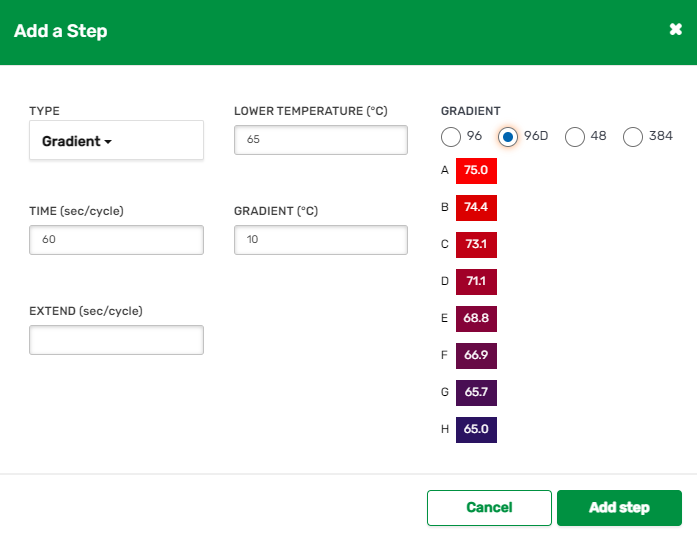
| 2. | Verify or change the existing values. |
Important: The instrument calculates the gradient range. When you enter a value in the gradient calculator's top and bottom fields, the software automatically calculates and assigns the temperature values for the remaining fields. When you enter a temperature in any field between the top and bottom field, the instrument automatically calculates the remaining fields. You cannot manually enter a temperature value in every field.
The fields are explained in the following table.
|
Parameter |
Description |
Range |
|---|---|---|
|
Lower Temperature |
Temperature of the last row in the plate |
30.0–99.0°C, set in tenths of a degree |
|
Time |
Hold time for the step. Hold time is the duration after the block has reached the target gradient Note: Setting the time to 0 sec |
1–64800 sec |
|
Gradient |
Temperature spread from the first row to the last row (shown in the gradient graphics below) |
Maximum allowed range is 24° C. Temperatures are set in tenths of a degree. You can set the lower temperature range from 30.0–99.0° C. You can set the upper temperature range from 31.0–100.0° C. |
|
Gradient calculator |
Select a plate size to display the corresponding gradient calculator Note: The gradient calculator for 384-well plates contains two rows. |
(96, 96D, |
| Extend |
(Optional) Instructs the thermal cycler to extend the hold time with each cycle. A positive number increases the hold time and a negative number decreases the hold time. Note: The Extend time is automatically set to 0 if you leave the field empty, and appears in the protocol grid only. |
–60 to 60 sec per cycle |
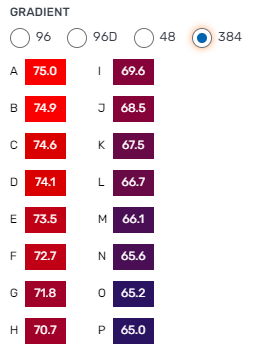
| 3. | Click Add Step or Save Changes. |
The gradient step is added or changed.
| 4. | Do one of the following: |
| ● | To add another step to your protocol, add the step and select the step type. For information, see the Help page for the specified step type. |
| ● | If you are finished creating or editing the protocol, click the Add button or Save button, respectively. The Manage |