
Viewing Instrument Details
You can view your
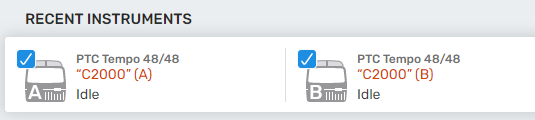
| ● | As icons in the Recent Instruments section of the Home page |

Note: The PTC Tempo 48/48 dual block thermal cycler appears as two instruments, one for each block.
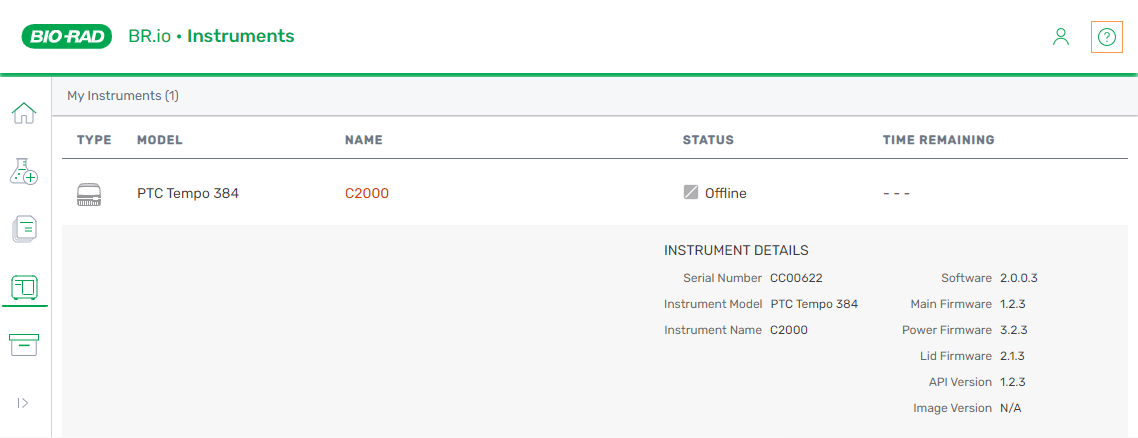
| ● | In list format on the Instruments page |
Important: You might need to update your PTC Tempo software and firmware to view the different instrument statuses that appear in the Status column in BR.io. Click the link below and scroll through the available downloads in the Download section to locate the PTC Tempo software and firmware.
https://www.bio-rad.com/pcrupdates
Log into the website and follow the prompts to download the installation files.
Instrument-specific details are described in the following table.
|
Column |
Description |
|||||||||||||
|---|---|---|---|---|---|---|---|---|---|---|---|---|---|---|
|
Type |
Icon for the instrument type or series |
|||||||||||||
|
Model |
Specific instrument model (96, Deepwell, 384 |
|||||||||||||
|
Instrument Name |
Name defined on the instrument touch screen |
|||||||||||||
|
Instrument Status |
Instrument status, as identified by the following icons:
|
|||||||||||||
|
Time remaining |
Time remaining to the completion of an in-progress run |
|||||||||||||
|
Expand and collapse arrows |
Icon displayed on the right, indicating expand or collapse the display when you select the instrument row:
|
|||||||||||||
|
Instrument details |
If needed for troubleshooting, you can copy the details and paste them into an email to Bio-Rad Technical Support. |
|||||||||||||
 Idle — Powered up, online, error free, and ready to execute a run
 Offline — Not detectable by
  Connecting —
  Running — Executing a run
 Paused — Run is paused
 Infinite hold — Automatically holding a specified temperature at a specified step in the protocol until you release the hold. For information, see
  Error — Instrument experienced an error
 Expand to show instrument details and run information
 Collapse to hide instrument details and run information